> ## Documentation Index
> Fetch the complete documentation index at: https://docs.pdfnoodle.com/llms.txt
> Use this file to discover all available pages before exploring further.
# Text
> Our flexible Text component is designed for any text content you want to include in your template. Unlike other components, you'll edit the text directly on the canvas preview for a more intuitive experience.
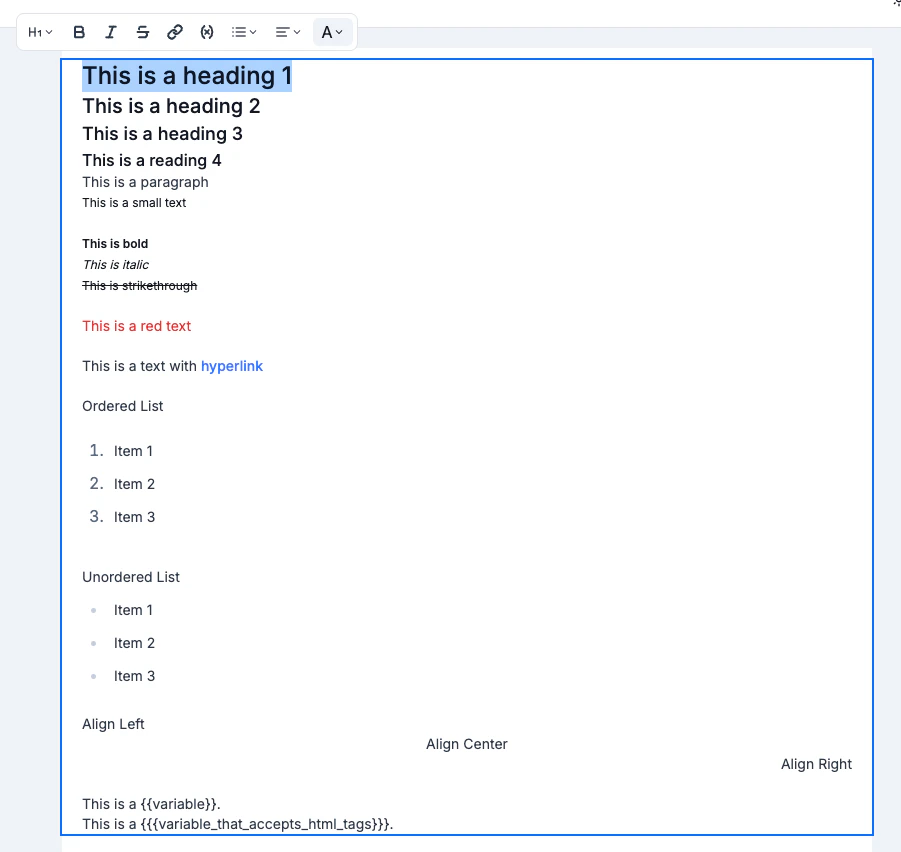 You can customize the following aspects of your text:
* **Style**: Headings 1, 2, 3, 4, paragraph or small text
* **Bold**
* **Italic**
* **Strikethrough**
* **Hyperlink**: Will only work on PDF output
* **Make it a variable**
* **List**: Ordered or Unordered
* **Align**: Left, center or right
* **Text color**
You can customize the following aspects of your text:
* **Style**: Headings 1, 2, 3, 4, paragraph or small text
* **Bold**
* **Italic**
* **Strikethrough**
* **Hyperlink**: Will only work on PDF output
* **Make it a variable**
* **List**: Ordered or Unordered
* **Align**: Left, center or right
* **Text color**
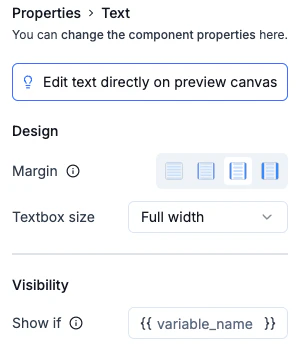 You can also edit the following properties:
* **Text container width**: If it should take all space or specific width
* **Horizontal margin**
### Font Size and Weight Conventions
We've standardized the font sizes and weights for each text style to ensure a consistent look across your templates. For example:
* **Heading 1:** font-size 24px and font-weight: 500
* **Heading 2:** font-size 20px and font-weight: 500
* **Heading 3:** font-size 18px and font-weight: 500
* **Heading 4:** font-size 16px and font-weight: 500
* **Paragraph:** font-size 14px and font-weight: 400
* **Small text:** font-size 12px and font-weight: 400
### Variables convention
We use [handlebars](https://handlebarsjs.com/) as our templating engine to differentiate between dynamic variables and static text in your templates. Here's how it works:
• Simple Variable: Enclose your text in double curly brackets: `{{ }}`.
• HTML Variable: Enclose your text in triple curly brackets: `{{{ }}}` to include HTML tags.
When you click on "Make it a variable," the selected text will automatically be transformed into a simple variable for your template.
For more details on Handlebars syntax, please check out our guide in the
[**HTML component**](https://docs.pdforge.com/knowledge-base/components/html).
### Horizontal Margin convention
Apart from the Page component, every other component can be configured with a horizontal margin for a cleaner, more polished layout. The horizontal margin adheres to our spacing convention:
* **No space** - 0 px
* **Small space** - 12px
* **Medium space** - 20px
* **Large space** - 40px
### Visibility convention
If you want to conditionally render a text component, you can set a variable that controls its visibility. When this variable is included in the variables payload, the component will display; if it's absent, the component won't appear in the final render.
You can also edit the following properties:
* **Text container width**: If it should take all space or specific width
* **Horizontal margin**
### Font Size and Weight Conventions
We've standardized the font sizes and weights for each text style to ensure a consistent look across your templates. For example:
* **Heading 1:** font-size 24px and font-weight: 500
* **Heading 2:** font-size 20px and font-weight: 500
* **Heading 3:** font-size 18px and font-weight: 500
* **Heading 4:** font-size 16px and font-weight: 500
* **Paragraph:** font-size 14px and font-weight: 400
* **Small text:** font-size 12px and font-weight: 400
### Variables convention
We use [handlebars](https://handlebarsjs.com/) as our templating engine to differentiate between dynamic variables and static text in your templates. Here's how it works:
• Simple Variable: Enclose your text in double curly brackets: `{{ }}`.
• HTML Variable: Enclose your text in triple curly brackets: `{{{ }}}` to include HTML tags.
When you click on "Make it a variable," the selected text will automatically be transformed into a simple variable for your template.
For more details on Handlebars syntax, please check out our guide in the
[**HTML component**](https://docs.pdforge.com/knowledge-base/components/html).
### Horizontal Margin convention
Apart from the Page component, every other component can be configured with a horizontal margin for a cleaner, more polished layout. The horizontal margin adheres to our spacing convention:
* **No space** - 0 px
* **Small space** - 12px
* **Medium space** - 20px
* **Large space** - 40px
### Visibility convention
If you want to conditionally render a text component, you can set a variable that controls its visibility. When this variable is included in the variables payload, the component will display; if it's absent, the component won't appear in the final render.