> ## Documentation Index
> Fetch the complete documentation index at: https://docs.pdfnoodle.com/llms.txt
> Use this file to discover all available pages before exploring further.
# Markdown
> Our Markdown component lets you work with both dynamic markdown strings (passed in the payload) or static markdown.
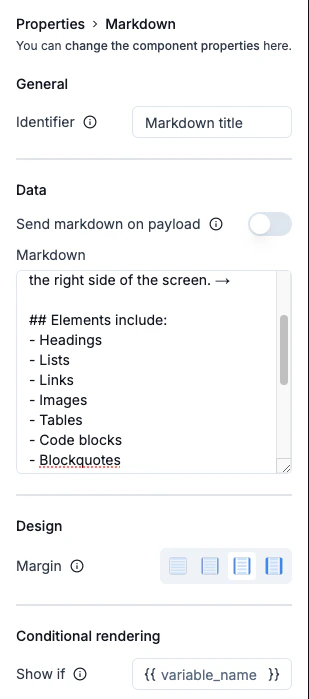 It follows our styling standards, supporting a wide range of elements, including:
* Headings
* Lists
* Links
* Images
* Tables
* Code blocks
* Blockquotes
* Inline code
* Horizontal rules
* Line breaks
### Example of markdown syntax:
````markdown theme={null}
# Styled Markdown Example
This is a paragraph with **bold** and _italic_ text.
## Lists Example
- First item
- Second item with **bold**
- Nested item with _italic_
- Another nested item
## Code Example
```javascript
function greeting(name) {
return `Hello, ${name}!`;
}
```
## Blockquote Example
> This is a blockquote.
> It can span multiple lines.
## Table Example
| Feature | Description |
| ------- | ------------------------- |
| Tables | Organized data display |
| Lists | Bullet points and numbers |
| Code | Syntax highlighted blocks |
## Link Example
[Visit pdf noodle blog](https://app.pdfnoodle.com/blog)
### Image Example

````
### Send markdown as payload
You can also mark the option "Send markdown as payload" to send it dynamically on the payload of your API call. The variable name will automatically be set using the "Identifier" field.
You can see more on payload schema of API calls on the [API
documentation](https://app.gitbook.com/o/6WKbIlYX72bYYe0wYnOa/s/5XMpOekw27OhJlJjfwYv/).
### Horizontal Margin convention
Apart from the Page component, every other component can be configured with a horizontal margin for a cleaner, more polished layout. The horizontal margin adheres to our spacing convention:
* **No space** - 0 px
* **Small space** - 12px
* **Medium space** - 20px
* **Large space** - 40px
### Visibility convention
If you want to conditionally render a text component, you can set a variable that controls its visibility. When this variable is included in the variables payload, the component will display; if it’s absent, the component won’t appear in the final render.
It follows our styling standards, supporting a wide range of elements, including:
* Headings
* Lists
* Links
* Images
* Tables
* Code blocks
* Blockquotes
* Inline code
* Horizontal rules
* Line breaks
### Example of markdown syntax:
````markdown theme={null}
# Styled Markdown Example
This is a paragraph with **bold** and _italic_ text.
## Lists Example
- First item
- Second item with **bold**
- Nested item with _italic_
- Another nested item
## Code Example
```javascript
function greeting(name) {
return `Hello, ${name}!`;
}
```
## Blockquote Example
> This is a blockquote.
> It can span multiple lines.
## Table Example
| Feature | Description |
| ------- | ------------------------- |
| Tables | Organized data display |
| Lists | Bullet points and numbers |
| Code | Syntax highlighted blocks |
## Link Example
[Visit pdf noodle blog](https://app.pdfnoodle.com/blog)
### Image Example

````
### Send markdown as payload
You can also mark the option "Send markdown as payload" to send it dynamically on the payload of your API call. The variable name will automatically be set using the "Identifier" field.
You can see more on payload schema of API calls on the [API
documentation](https://app.gitbook.com/o/6WKbIlYX72bYYe0wYnOa/s/5XMpOekw27OhJlJjfwYv/).
### Horizontal Margin convention
Apart from the Page component, every other component can be configured with a horizontal margin for a cleaner, more polished layout. The horizontal margin adheres to our spacing convention:
* **No space** - 0 px
* **Small space** - 12px
* **Medium space** - 20px
* **Large space** - 40px
### Visibility convention
If you want to conditionally render a text component, you can set a variable that controls its visibility. When this variable is included in the variables payload, the component will display; if it’s absent, the component won’t appear in the final render.