> ## Documentation Index
> Fetch the complete documentation index at: https://docs.pdfnoodle.com/llms.txt
> Use this file to discover all available pages before exploring further.
# PDF metadata
# PDF metadata
### PDF Metadata options
Here's a list of all the **optional parameters** that you can send as an object "metadata" while using our endpoints:
A human-readable name for the document, like a book title. Default: the name
of the template
The individual or organization that created the document. Default: `pdfnoodle`
A brief description of the document's topic.
A list of keywords describing the content.
The original software that created the content before it was turned into a
PDF. Default: `pdfnoodle`
These values will appear in the PDF's file details. On macOS, you can check them by right-clicking the file and selecting **Get Info** in Finder.
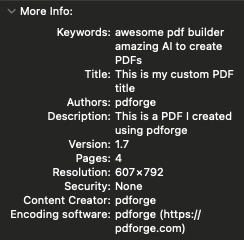 The only field you can't override is the **Encoding software.** It's
automatically set by our system.
The only field you can't override is the **Encoding software.** It's
automatically set by our system.